How Much PSU Wattage Do You Really Need? A Complete Gaming PC Power Supply Guide (2026)
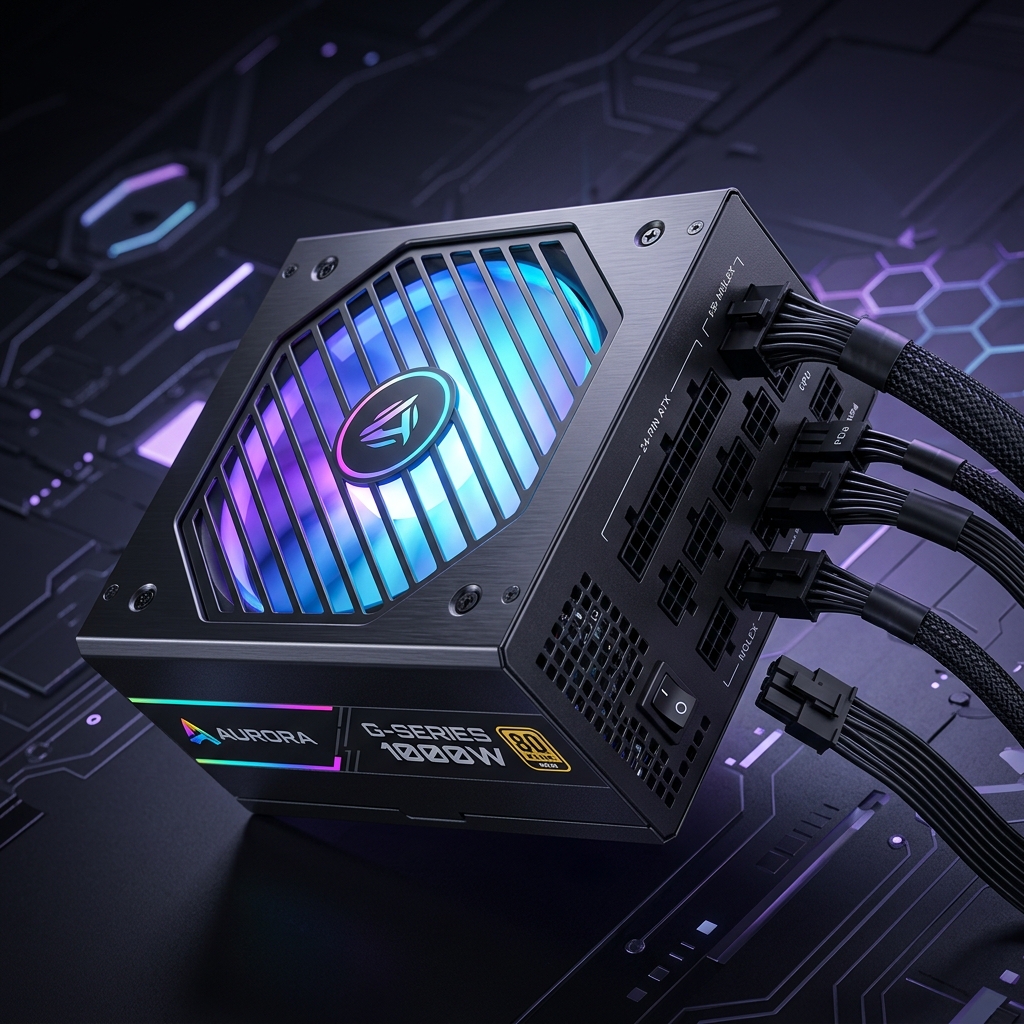
Choosing the right power supply wattage and efficiency rating is critical for gaming PC stability.
If you've ever stared at a wall of 550W, 650W, 750W, and 850W power supplies wondering which one your build actually needs, you're not alone. Picking the wrong power supply unit (PSU) is one of the most common — and most expensive — mistakes gaming PC builders make. Buy too little, and your system can crash under load or refuse to boot with a new GPU. Buy too much, and you're paying for capacity and inefficiency you'll never use.
This guide breaks down exactly how PSU sizing works, what actually draws power in a gaming rig, and how to get a precise number in under a minute using our Gaming PC PSU Calculator.
Why PSU Wattage Actually Matters
A power supply's wattage rating is the maximum continuous power it can safely deliver to your components. Every part in your system — CPU, GPU, motherboard, RAM, storage drives, fans, and RGB — pulls power from that single source. If total demand exceeds what your PSU can supply, you'll see symptoms ranging from random reboots and black screens during intense gaming sessions to the PSU tripping its own protection circuits and shutting the system down entirely.
Modern GPUs make this more complicated than it used to be. High-end graphics cards can have power draw that spikes well above their rated Thermal Design Power (TDP) for milliseconds at a time — a phenomenon called transient spiking. A PSU that looks "big enough" on paper based on average draw can still brownout during these spikes if it doesn't have enough headroom or quality capacitors to absorb them.
The Core Components That Drive Your Wattage Needs
Graphics Card (GPU)
The GPU is almost always the single largest power consumer in a gaming PC, frequently accounting for 40–60% of total system draw under load. Flagship cards can pull well over 300W on their own, while mid-range cards typically sit in the 150–220W range.
Processor (CPU)
CPUs vary widely depending on core count and whether they're tuned for efficiency or raw performance. Enthusiast unlocked chips running at higher voltages for extra clock speed can pull noticeably more power than their stock TDP suggests, especially under sustained all-core loads like video encoding or heavy multitasking while gaming.
RAM and Storage
Individually, RAM sticks and NVMe/SATA drives draw relatively little power — but they add up, especially in builds with four RAM modules or multiple high-speed SSDs.
Fans, RGB, and AIO Coolers
Case fans, RGB lighting controllers, and all-in-one liquid cooler pumps each draw a small but non-trivial amount of continuous power. A build with heavy RGB and several fans can add noticeably more load than a minimalist build.
Overclocking Headroom
Overclocking any component increases both its voltage and power draw, sometimes significantly. If you plan to overclock your CPU, GPU, or both, you need extra wattage headroom beyond your baseline calculation — usually an additional 15–20%.
The 80 PLUS Efficiency Factor
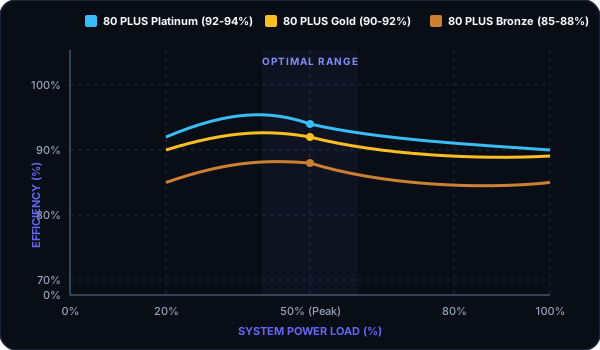
Figure 1: Peak power efficiency curves for 80 PLUS certified units, showing maximum efficiency at 40-60% system load.
PSUs are rated under the 80 PLUS certification program (White, Bronze, Gold, Platinum, Titanium), which measures how efficiently the unit converts AC power from the wall into the DC power your components use. A Gold-rated 750W PSU wastes less energy as heat than a Bronze-rated 750W unit, which means it runs cooler, quieter, and cheaper over time — even though both are rated for the same output. Efficiency doesn't change how much wattage you need, but it does change how much you pay in electricity and how much thermal stress the unit experiences long-term.
Common PSU Sizing Mistakes
- Copying a "recommended PSU" from a GPU's box — these figures are often conservative marketing numbers that don't account for your specific CPU, storage, or peripherals.
- Ignoring transient power spikes — especially relevant for high-end GPUs, where momentary spikes can exceed rated TDP by 30% or more.
- Not leaving headroom for future upgrades — if you plan to add a GPU upgrade in 2–3 years, sizing exactly to today's needs means an early replacement.
- Assuming bigger is always safer — running a PSU at very low load (under 20% of capacity) can actually reduce efficiency, since most units are tuned for peak efficiency around 40–60% load.
How Our Gaming PC PSU Calculator Works
Rather than guessing or adding up spec-sheet numbers by hand, our Gaming PC PSU Calculator takes your actual build details — CPU model, GPU model, RAM configuration, storage drives, and whether you plan to overclock — and outputs a recommended wattage range with built-in safety headroom.
To use it:
- Select your CPU and GPU from the dropdown (or enter their TDP manually if not listed).
- Add your RAM capacity and number of storage drives.
- Toggle on overclocking if applicable.
- Get an instant recommended wattage range, plus a suggested efficiency tier based on your budget and power draw.
The calculator factors in realistic overhead for spikes and non-GPU/CPU components, so the number you get is a genuinely safe target — not just a bare-minimum figure that leaves no margin for error.
A Practical Example
Take a mid-range build: a 6-core unlocked CPU paired with a mid-tier GPU rated around 200W TDP, 32GB of RAM, one NVMe drive, and three case fans with no overclocking. Adding up baseline component draw, motherboard and peripheral overhead, and a conservative safety margin typically lands this kind of build comfortably in the 550–650W range on a quality Bronze or Gold-rated unit. Push the same build to include overclocking and a second storage drive, and the safe range shifts upward by roughly 50–100W.
This is exactly the kind of scenario-specific math the calculator handles for you automatically, rather than relying on generic rules of thumb that don't account for your exact parts list.
FAQs
- Do I need to match my PSU wattage exactly to my components' total draw? No — you want headroom above your calculated draw, typically 20–30%, to account for power spikes, aging components (PSUs lose some capacity over years of use), and future upgrades.
- Is a higher wattage PSU always better? Not necessarily. Oversized PSUs cost more upfront and can run at lower efficiency if your system rarely draws enough power to reach their optimal load range. Right-sizing with headroom is better than maximum overkill.
- Does PSU wattage affect gaming performance? An adequately sized PSU won't improve FPS, but an undersized one can cause instability, crashes, or throttling under load — which absolutely hurts real-world performance and can damage components over time.
- How often should I replace my PSU? Most quality PSUs last 7–10 years, but efficiency and capacitor health degrade over time. If you're reusing an older PSU in a new high-power build, it's worth rechecking your numbers with the calculator rather than assuming it still has full rated capacity.
Try It Yourself
Skip the spreadsheet math and get a personalized, safety-margin-included wattage recommendation in seconds. Open the Gaming PC PSU Calculator and plug in your exact build to find out precisely what you need before you buy.
Interactive Inline Calculator
Adjust target values below to run formulas in real-time instantly.
Adjust Inputs
Calculated Results
Join 10,000+ Students
Get our weekly Band 7+ IELTS vocabulary cheat sheet and exam strategies delivered straight to your inbox.